
Before you buy a used laptop, check whether you will be able to activate and manage it as your own—not just whether the screen turns on. A computer can appear functional during a seller's demonstration yet still be associated with a previous owner's account or an organization's deployment system. Battery wear and repair costs matter, but unresolved ownership or management restrictions can make a bargain unusable.
The most useful inspection separates three risks: ownership and activation, physical and battery condition, and the total cost after likely repairs.
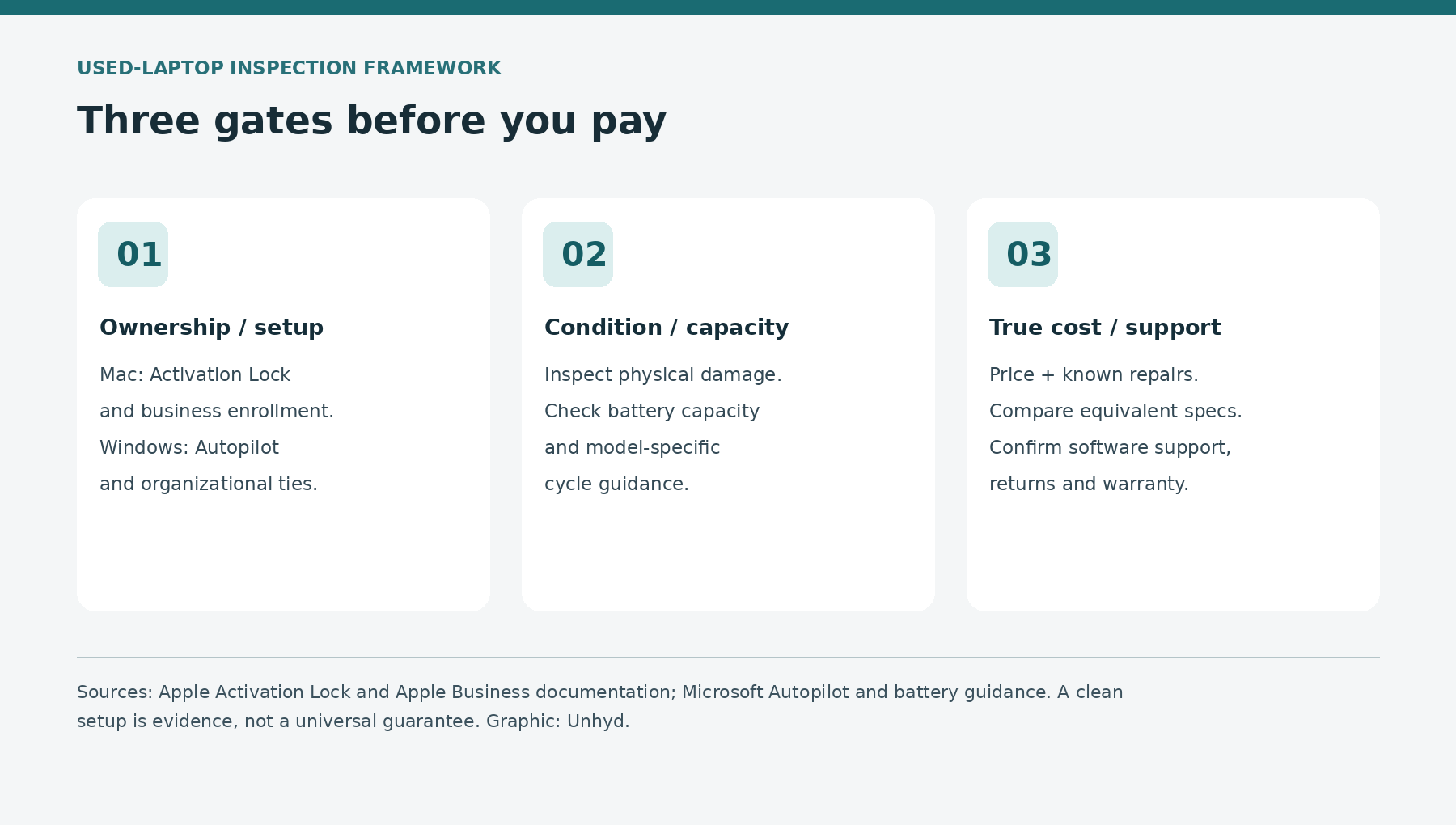
Apple's Activation Lock and business-device documentation, Microsoft's Windows Autopilot guidance and the operating systems' battery tools provide a practical basis for those checks. They do not provide a public database that certifies every secondhand laptop as safe to buy.
How to buy a used laptop: confirm the seller can transfer it
Ask for the exact make, model, year or generation, storage, memory, charger and serial number before meeting. Request a receipt or other reasonable ownership documentation, especially for a business or school surplus machine. A receipt helps establish the transaction, but it does not automatically prove that an Apple Account or enterprise enrollment has been released.
Choose a transaction with a clear return window, a written description of the device and a payment method offering appropriate buyer protections. Private-party sales may have different protections from retail purchases, depending on location and terms. Avoid a seller who refuses to let you inspect setup status or insists that a lock can be “fixed later” without providing evidence.
Do not ask the seller to disclose their password. The legitimate owner should sign out and remove account associations themselves, following the manufacturer's instructions. If the machine contains someone else's files, do not browse them; ask the seller to back up and erase the device before testing a fresh setup.
For a used Mac, check Activation Lock and business enrollment separately
Apple's Activation Lock guidance explains that supported Macs linked to Find My can require the previous owner's Apple Account credentials before erasure or reactivation. A Mac that boots to a familiar desktop is not necessarily free of Activation Lock. The seller should turn off Find My and prepare the Mac for transfer using Apple's seller checklist.
On supported Macs, Apple's Erase All Content and Settings process signs out of Apple services and turns off Find My and Activation Lock when completed properly. Because erasure is destructive, it is the seller's responsibility to back up their files and initiate it—not the prospective buyer's job to wipe an unknown person's computer. Older Macs have different erase and sign-out procedures.
A second issue is organizational enrollment. Apple documents that Macs assigned through Apple Business or Apple School Manager can be recognized as organization-owned during Setup Assistant when connected to a network. A Mac may therefore be free of a personal Activation Lock yet still show a remote-management enrollment screen. The organization needs to release a device it no longer owns through its authorized management process; Apple's business release instructions say the device should be erased and restored after release.
Practical test: with the seller's permission and after their backup and erase, connect the Mac to Wi-Fi during Setup Assistant. Check that it does not demand an unknown Apple Account or unexpected organizational enrollment. Do not enter your personal credentials merely to help a seller complete an uncertain sale. Reaching the setup screen is useful evidence, not a lifetime guarantee against later problems.
For a used Windows laptop, understand Autopilot registration
Microsoft's Windows Autopilot registration overview explains that corporate devices can be registered with a cloud service that recognizes their hardware during setup. Microsoft instructs organizations to deregister devices when they permanently leave the organization. A local Windows reset alone does not establish that the cloud registration has been removed.
During a seller-authorized fresh Windows setup, connect to the internet and watch for an unexpected company-branded sign-in or enrollment demand. Ask the seller or refurbisher for confirmation that any former employer or school has released the machine from its deployment and management systems. If the seller claims it was a corporate device but cannot obtain release, pause the purchase. There is no legitimate reason for a buyer to attempt to bypass another organization's controls.
On a configured Windows machine, Settings > Accounts > Access work or school may show a current organizational connection. Microsoft's account-management documentation explains what that connection means. But an empty screen is not a conclusive Autopilot clearance check: device registration can exist in Microsoft's service separately from a local user account. A clean, internet-connected setup and seller documentation are stronger together than either alone.
Battery health: measure capacity, not just the percentage on screen
A battery showing 100% charge is not necessarily in good health. The charge percentage indicates how full the battery is relative to its current usable capacity. As lithium-ion cells age, that capacity can shrink. A fully charged worn battery may still deliver substantially less runtime than a new one.
On Windows 11, Microsoft documents the built-in battery report. On a laptop the seller has authorized you to inspect, open Command Prompt and run powercfg /batteryreport, then open the generated HTML report at the path shown. Compare Design Capacity with Full Charge Capacity if both are reported. The ratio is an estimate, not an independent laboratory measurement.
For a transparent hypothetical example, a battery with 40,000 mWh full-charge capacity and 50,000 mWh design capacity has 40,000 ÷ 50,000 × 100 = 80% of its original rated capacity. That does not guarantee 80% of the laptop's original runtime, because software, screen brightness, processor workload and temperature also affect power use. If the report omits a field, do not invent a capacity estimate.
For MacBooks, Apple documents cycle-count lookup through System Information > Hardware > Power, along with model-specific maximum cycle counts. One cycle represents a cumulative full battery discharge, not necessarily one charging session. Cycle count and capacity are related but different indicators; a low cycle count does not rule out aging or damage. Consult the specific model's guidance rather than applying one threshold to every Mac.
Inspect for damage and test the laptop unplugged
Check the case, screen, hinges, keyboard, trackpad, ports, camera, speakers and charging connection. Ask whether the battery, screen or motherboard has been replaced and whether the repair was documented. Test Wi-Fi, a known-good peripheral and the included charger if possible. Confirm the exact RAM and storage in the operating system rather than trusting the listing's headline.
Look for physical swelling: a lifted trackpad, bulging case or separating seam may indicate a dangerous battery problem. Microsoft warns that visibly expanded lithium-ion batteries require caution. If the battery is swollen, stop using or charging the device and seek qualified service; do not press the case back into shape or puncture it.
Unplug the laptop during a short, agreed inspection and verify that it stays on and responds normally. Watch for abrupt shutdowns, abnormal heat or a charge percentage that falls unexpectedly. A ten-minute test cannot establish all-day endurance or rule out intermittent faults. If runtime is central to the purchase, arrange a longer return window or an independent inspection.
Check software support, storage and what is included
Record the exact model identifier and current operating-system version. Then check the manufacturer's official compatibility and support information. A computer that still boots may no longer receive the security updates or application versions you need. Do not assume every older Intel Mac or Windows laptop supports the latest operating system.
Confirm storage capacity, whether it is replaceable, and whether the charger is the correct model and rating. Some modern laptops have soldered memory or storage, making later upgrades impossible or impractical. Check the manufacturer's service documentation rather than treating every device as upgradeable. Unhyd's photo-backup guide explains why independent recovery copies matter before migrating files to a replacement computer.
Ask about the seller's return policy, written warranty and who pays for a failed repair. An ordinary manufacturer's warranty, a refurbished-device warranty and an optional service contract are different things. Unhyd's extended-warranty analysis explains why the dates, exclusions and claim fees should be compared rather than assuming a paid plan adds full coverage.
Compare the true cost with a like-for-like alternative
Consider a hypothetical used laptop listed for $550. Suppose an independent technician quotes $180 for a necessary battery replacement, and the buyer expects no other costs. The effective acquisition cost would be $550 + $180 = $730. A second, otherwise comparable laptop offered for $650 with documented battery condition and a usable return policy could be the better value under those assumptions. These prices are illustrative, not observed market offers or estimates of typical repair charges.
The comparison is only fair if processor class, memory, storage, display condition, included charger, software support and warranty terms are sufficiently similar. A newer processor or much better screen can justify a higher price; an unresolved Activation Lock or enterprise registration can make any apparent saving irrelevant. Add tax, shipping and known repair fees consistently, and keep unknown costs labeled as unknown.
Apple's Certified Refurbished policy provides one example of a seller-defined standard: it advertises functional testing and a one-year limited warranty. The page specifies new batteries for refurbished iOS devices; it does not promise a new battery in every refurbished Mac. Other refurbishers may follow different standards. Read the exact seller policy rather than borrowing Apple's promises for unrelated listings.
What to do if a lock or management prompt appears after purchase
Preserve the listing, receipt, seller messages, serial number and a photograph of the on-screen prompt that does not expose personal credentials. Contact the seller or marketplace promptly within the stated return or dispute window. For an Activation Lock problem, Apple documents owner-removal and proof-of-purchase support routes, but approval is not automatic. For an organizational enrollment issue, the organization or authorized reseller may need to complete release or deregistration.
Avoid paid “unlock” services that promise to defeat ownership protections or demand your Apple Account password, Microsoft credentials or payment outside the marketplace. A device that cannot be lawfully transferred should be returned or resolved through the legitimate owner, seller and manufacturer. The correct remedy depends on the transaction and jurisdiction; this guide is not legal advice.
A practical used-laptop purchase decision
Proceed only when the seller can reasonably establish ownership and the computer completes an appropriate, network-connected personal setup without unexplained locks. Then weigh measured battery condition, physical inspection, supported software and total cost against comparable alternatives. If a critical check cannot be completed, make the uncertainty part of the decision rather than treating it as a small cosmetic flaw.
The strongest used-laptop bargain is not simply the lowest asking price. It is a machine whose ownership can be transferred, whose condition can be evaluated and whose remaining costs are understandable before money changes hands.