
The Microsoft 365 outage that began on November 12, 2026, disrupted email and features tied to Microsoft's connected workplace services. By November 13, recovery reports showed why restoring a cloud platform is not a single on-off event: users may regain access while delayed messages, dependent features and interrupted workflows still need attention.
Microsoft's public service-health page reported degradation affecting business and consumer services. A publicly accessible University of Pennsylvania extract of Microsoft incident notices documented Exchange Online incident EX1550543 and broader Microsoft 365 incident MO1550821. The extract preserves Microsoft's earlier technical updates; it should not be read as a guarantee that every service remained impaired at publication time.
What the Microsoft 365 outage affected
The incident was not simply a case of the Outlook application failing to open. Microsoft's incident communications identified problems connecting to Exchange Online through Outlook on the web, desktop interfaces and mobile-related methods, with possible email-delivery delays. The wider notice identified dependent functions in Teams, Copilot, SharePoint and other Microsoft 365 products.
Those distinctions matter. Microsoft's notice said core Teams messaging and online meetings remained largely functional even as scenarios relying on Exchange Online—such as some calendar and meeting-scheduling functions—could fail. Similarly, access to files stored directly in SharePoint could remain functional while features requiring Exchange data were impaired. Saying that every Microsoft product was entirely down would overstate the documented impact.
The failure illustrated a common design reality of cloud software: services marketed as separate tools may depend on shared identity, messaging, networking or data infrastructure. An incident in one layer can therefore produce symptoms in multiple products without each product experiencing an independent failure.
What Microsoft said about the technical problem
In an update recorded on November 13 at 01:12 UTC, Microsoft's broader incident notice said a process responsible for establishing secure connections on affected servers was becoming overwhelmed, leaving servers unable to process requests. Engineers were validating a configuration change and reverting a recent network configuration change that correlated with the beginning of the impact. That notice described an investigation and recovery measures, not a completed final root-cause report.
Earlier notices described servers that initially recovered but became unresponsive again when traffic returned. Microsoft also described routing connections through alternatives, limiting certain traffic and rebuilding some affected servers with an earlier software configuration. The sequence explains why initial restoration can be unstable: bringing capacity back is different from proving it remains healthy under normal load.
Independent reporting by the Associated Press described widespread consequences and a gradual recovery, while noting Microsoft's account that the event was not a cyberattack. That assessment should not be confused with an independent forensic finding. A full post-incident explanation may clarify which technical changes caused the failure and which were only correlated with it.
Why access returning is not the end of recovery
Consider an organization whose email service becomes reachable again. Employees may be able to sign in while queued messages arrive late, scheduled notifications have been missed, or a connected application still needs to reconnect. A recovery notice for one component does not automatically resolve every downstream business task.
A concrete example came from Cochise County, Arizona. In a November 13 public update, the county said email was flowing again but messages could still be delayed. It advised people who had emailed county addresses on November 12 to resend their messages. That is a local operational instruction, not a universal recommendation to resend every message to every Microsoft customer.
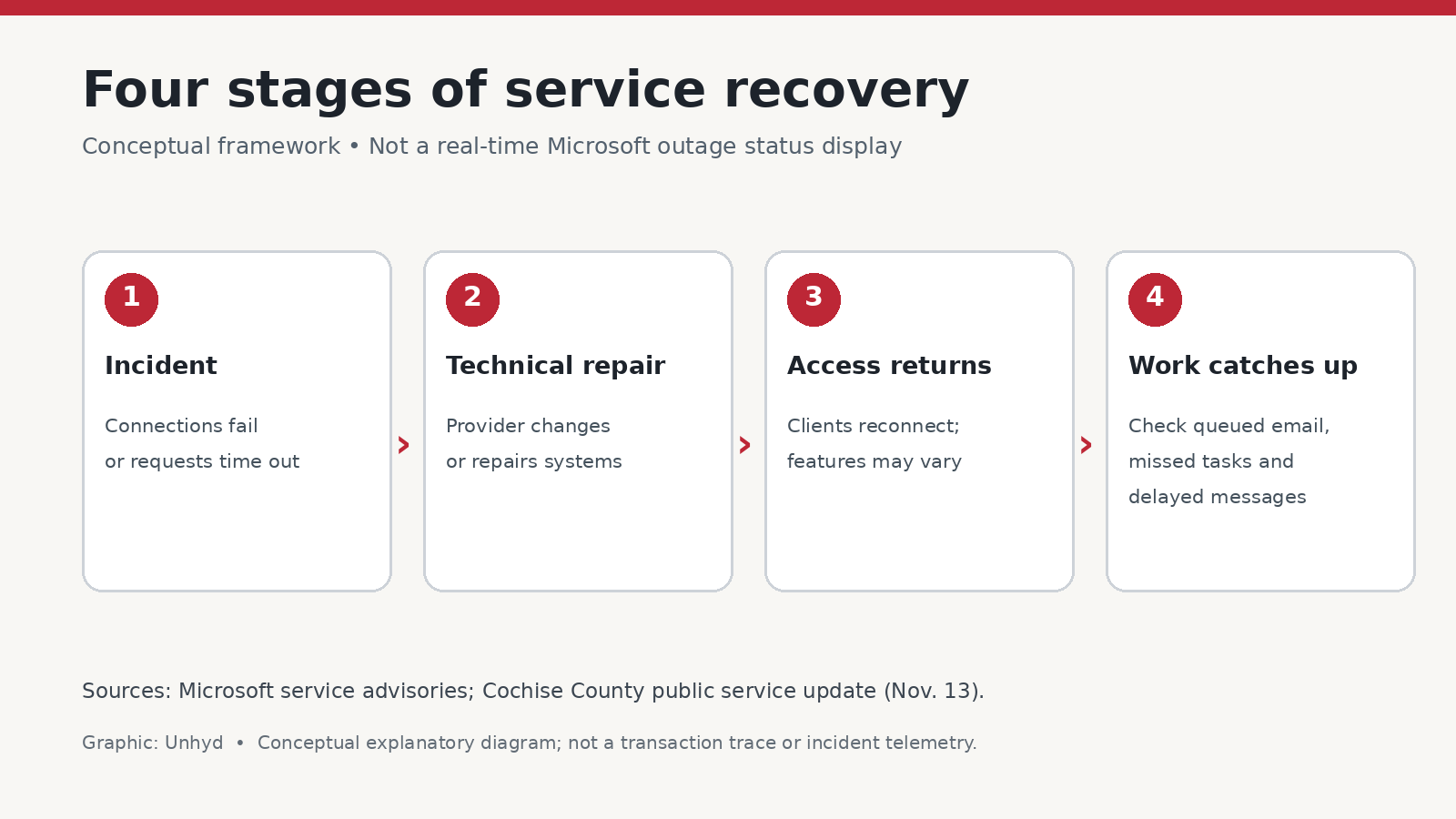
Organizations should therefore distinguish four stages: identifying a disruption, repairing the affected infrastructure, restoring user access and reconciling work that was delayed or missed. A provider's status dashboard primarily describes service conditions; the last stage may depend on the customer's own systems and procedures.
A practical continuity checklist for organizations
First, check the official Microsoft service-health advisory and the organization's administrator dashboard for the affected incident, scope and latest update. Do not rely on screenshots circulating without timestamps. Record which functions were impaired and which continued working, because the distinction affects both incident response and customer communications.
Second, test critical workflows rather than merely checking whether a login succeeds. Send and receive a controlled email, verify calendar invitations, confirm that customer-facing forms and alerts have resumed, and check whether connected applications are processing requests. Avoid generating large volumes of test traffic that could complicate recovery.
Third, identify time-sensitive communications that may have been missed. For a medical practice, government office or customer-service team, the consequences can be more significant than inconvenience. Follow applicable privacy, recordkeeping and operational rules when using an alternative communication channel; a personal messaging app is not automatically an appropriate substitute.
Fourth, document a fallback plan for future incidents. That can include an independently accessible status page, alternate contact routes, offline access to essential instructions and a clear decision-maker for activating continuity procedures. Redundancy has costs and limitations, and a second tool can share dependencies with the first, so organizations should test their actual fallback arrangements.
The bigger question is dependency, not just downtime
The outage is a reminder that the operational risk of a cloud service is partly determined by how many essential tasks depend on it. A workplace may have several apps but still rely on one email or authentication path. Counting product subscriptions is not the same as measuring resilience.
For decision-makers, the useful follow-up is a dependency map: which services are essential, which rely on Microsoft 365 components, how long the organization can operate without them, and what recovery evidence it needs before declaring normal operations. That exercise is more actionable than a generic instruction to abandon cloud software.
Microsoft's evolving status updates should remain the source for current restoration claims. The November 12–13 incident already shows a narrower but important lesson: technical recovery and business recovery happen on different timelines, and organizations need a plan for both.