
Learning how to prevent SIM swapping starts with the mobile account that controls your phone number—not just the phone in your hand. A criminal who persuades a carrier to move your number to another SIM or eSIM may receive calls and text-message login codes meant for you. The strongest practical defense combines a carrier account PIN, available number-transfer and SIM-change locks, and authentication methods that do not depend on SMS.
The Federal Trade Commission's SIM-swap guidance explains how an attacker can impersonate a customer and request a replacement SIM. The related tactic, port-out fraud, moves the number to a different carrier. Both can undermine accounts that use a phone number to reset passwords. This guide explains the distinctions, how to enable carrier protections, and what to do if your phone suddenly loses service.
What is SIM swapping, and why does it work?
Your mobile number is not permanently tied to the physical phone you own. Carriers routinely transfer numbers to new devices, replacement SIMs and eSIMs when customers upgrade or replace equipment. A fraudster attempts to abuse that legitimate process by convincing a carrier to approve a change without the customer's authorization.
In a SIM swap, service moves to another SIM or eSIM associated with the same carrier account. In port-out fraud, the number is transferred to an account at another carrier. Either can cause the legitimate customer's device to stop receiving normal cellular calls and texts. The attacker may then intercept one-time codes or use a phone-based recovery process to gain access to email, financial or social-media accounts.
This is different from malware installed on your phone, and it is not proof that the attacker can read every encrypted conversation or access every account. The danger depends on which services trust the number, what other credentials the attacker possesses, and which recovery safeguards are in place.
How to prevent SIM swapping: start with your carrier account
Sign in directly through your mobile provider's official app or website, not through a link in an unexpected text message. Review authorized users, contact details, recovery options and the account PIN or passcode. The FTC recommends setting a PIN or password on the cellular account to help protect against unauthorized changes. Use a code that is not your birthday, address, voicemail PIN or another easily guessed detail.
Next, look for protections against two different actions: replacing the SIM/eSIM and transferring the number to another carrier. Some providers combine them in one account lock; others offer separate switches. Confirm which transactions your carrier's feature actually blocks and whether the protection covers every line on a family or business account.
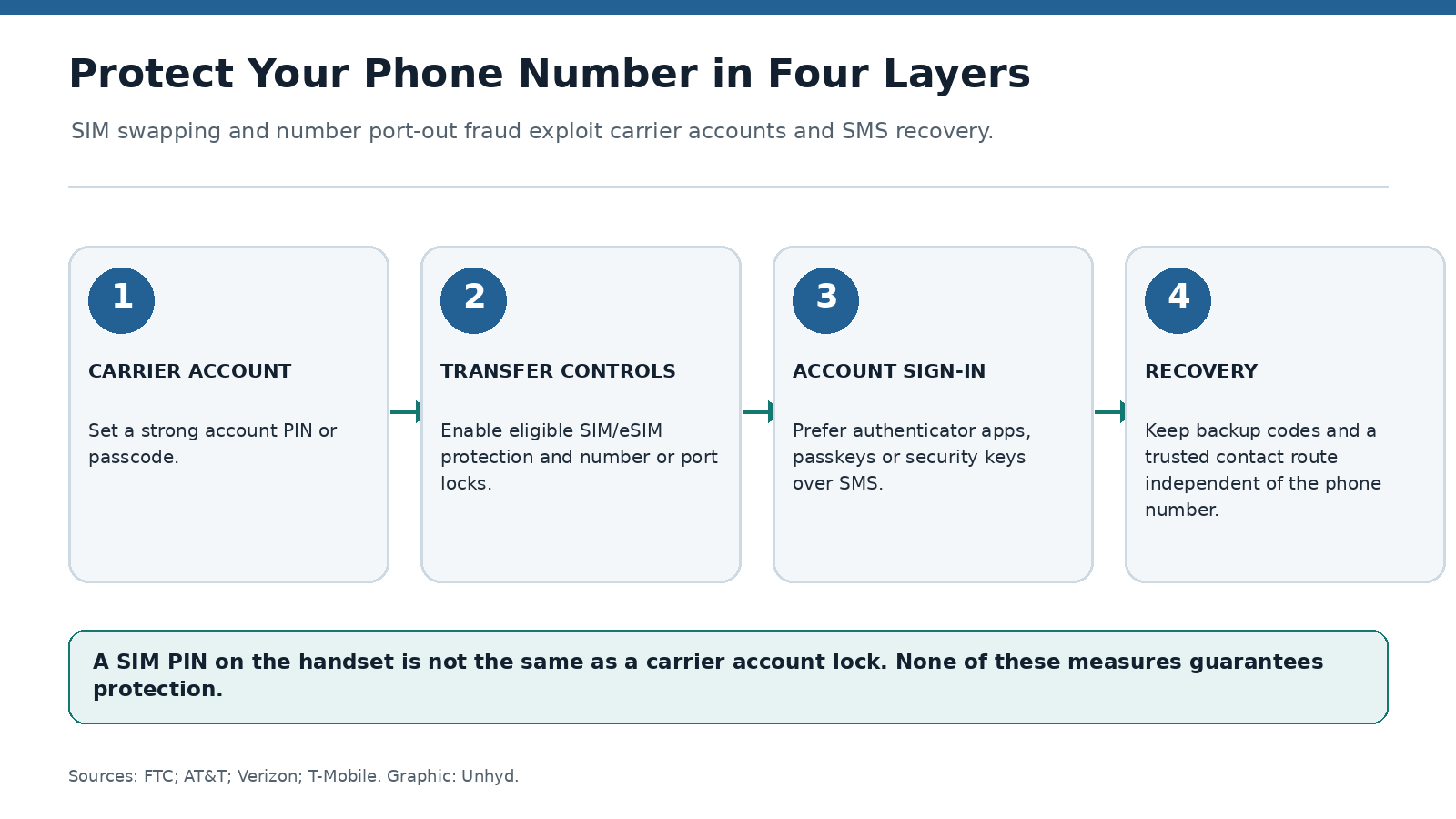
Do not confuse a carrier account lock with a handset SIM PIN. A device-level SIM PIN can restrict use of a physical SIM after a restart or transfer to another device, but it does not by itself prevent a customer-service representative from authorizing a replacement SIM or a fraudulent number port. The account-side controls are central to this threat.
Where to find SIM and number-transfer protections
AT&T: The provider describes Wireless Account Lock as a free feature accessible through the myAT&T app. It blocks specified account transactions while enabled. Check the current instructions and whether you have the permissions needed to turn it on; a legitimate device upgrade may require temporarily unlocking the account.
Verizon: Its My Verizon instructions distinguish SIM Protection, which blocks unauthorized SIM or device changes, from Number Lock, which blocks transfers to another carrier. Verizon says Number Lock must be disabled before a Number Transfer PIN can be generated for a legitimate port. Verify both settings for the applicable line rather than assuming one protects against every transaction.
T-Mobile: Its official security resources describe Port Out Protection and point customers toward SIM-protection controls. Availability, eligibility and account-management steps can differ by plan and account type; check the live carrier settings rather than relying on screenshots from an older guide.
Other carriers and mobile virtual network operators may use different names or procedures. If you cannot locate a lock, ask the provider through its verified support channel whether it offers a number-transfer freeze, SIM-change restriction, account PIN and notification of pending changes. Document the answer without sharing your PIN or recovery codes.
Move important accounts away from SMS verification
A carrier lock reduces one route to account takeover, but it does not make SMS a phishing-resistant authentication method. Review the sign-in and recovery settings for your primary email account first, then financial accounts, cloud storage, password manager and other high-impact services. Where supported, use a passkey, a hardware security key or an authenticator app instead of text-message codes.
The FTC specifically recommends considering an authentication app or security key because SMS verification may not stop a SIM swap. An authenticator app generates codes independently of your phone number, although the device and app still require protection and a recovery plan. Passkeys and hardware security keys can offer stronger resistance to phishing, but their effectiveness depends on how the service handles fallback and account recovery.
Removing SMS as a primary login factor may not be enough if the same account still allows password resets or recovery by text. Inspect recovery-phone settings, backup email addresses, trusted devices and active sessions. Keep offline recovery codes in a secure location you can access without the affected phone. Test that your recovery route works before disabling a method you currently depend on.
What to do if your phone suddenly loses service
Unexpected loss of mobile service can be caused by an outage, a billing issue, a damaged SIM or an unauthorized transfer. Do not assume fraud from one symptom alone. But if the phone unexpectedly shows no service and you also receive a SIM-change notice, a password-reset alert or unusual account activity, act quickly.
- Use another phone or a trusted internet connection to contact your carrier through its official support channel. Ask whether a SIM replacement, eSIM activation or port request was made, and request immediate reversal or suspension of any unauthorized change.
- Secure your primary email and carrier accounts. Change compromised passwords, review recovery methods and sign out unfamiliar sessions. Prioritize accounts that can reset other accounts.
- Contact your bank or payment providers immediately if you see suspicious transfers, charges or account changes. Ask about temporary restrictions and dispute procedures as appropriate.
- Preserve confirmation emails, support case numbers and a timeline. Report suspected identity theft using the FTC's recovery service; an unresolved carrier complaint can also be submitted through the FCC complaint portal.
Do not read a one-time code aloud to someone who called claiming to be from your carrier or bank. A legitimate-looking caller ID or urgent security warning is not independent proof of identity. Call back using a number you obtained separately from the organization's official website or your account documents.
SIM swap protection versus online privacy
Publicly available phone numbers, addresses and personal details can make impersonation attempts easier, but removing every online listing is neither possible nor necessary for a meaningful defense. Unhyd's guide to removing personal information explains free opt-outs and search-result removal. Treat those steps as exposure reduction, not a replacement for carrier locks or secure account recovery.
Fraud reporting is another separate layer. Unhyd's comparison of federal fraud-loss reports explains why complaint totals do not represent every incident or a single national census. The practical lesson is to report suspected compromise promptly even when you do not know whether financial loss has occurred.
A five-minute review you can repeat
Open the carrier app and confirm your account PIN, authorized users, SIM-change restriction and number-transfer lock. Then review your primary email account's recovery methods and make sure at least one strong authentication option does not depend on receiving an SMS. Keep a second recovery route that remains available if your phone is lost, stolen or disconnected.
Repeat the review after changing carriers, upgrading a device, adding a family member or receiving an unexplained security notification. If a lock must be disabled for a legitimate transfer, re-enable the appropriate protection after the change and verify the account settings again.
SIM swapping is a failure of identity verification around a phone number, not a problem that can be solved by a stronger screen lock alone. The defensible strategy is layered: restrict carrier changes, reduce dependence on texted codes, and make recovery possible without the number. No single setting guarantees protection, but each layer closes a different route an attacker might otherwise exploit.