

A backup restore test answers a question that a green dashboard cannot: if the original system or account disappeared today, could your organization recover usable work from a separate copy? For a small business, the first useful test does not require shutting down production. It requires choosing one important dataset, restoring it safely, checking that it opens and recording how long recovery took.
The distinction is supported by the Cybersecurity and Infrastructure Security Agency's ransomware guidance, which recommends offline, encrypted backups and regular tests of backup availability and integrity. NIST's small-business cybersecurity guide places recovery inside a broader risk-management process. This Unhyd guide turns those principles into a practical rehearsal and a reusable result sheet; it is not a certification or a claim that any particular backup product has been tested.
Before the test, define what success means
Start with the business activity rather than the storage device. A restored file that no one can open is not a successful recovery. Neither is a recovered database that cannot connect to its application. Ask which service must return first: orders, payroll, customer records, email, a website or another critical process. Identify its owner and the person authorized to perform a restore.
Write down two recovery objectives. The NIST definition of recovery point objective (RPO) concerns the point in time to which data must be recovered after an outage. In practical terms, it describes the maximum acceptable gap between the recovered data and the incident. Recovery time objective (RTO) concerns the targeted time to restore the service. The targets should come from business impact, not from what a vendor's marketing page promises.
For illustration only, a small retailer might decide that an order system should recover within four hours and lose no more than 24 hours of recent transactions. Those are hypothetical objectives, not universal standards. A payment system, hospital or regulated service could require very different targets.
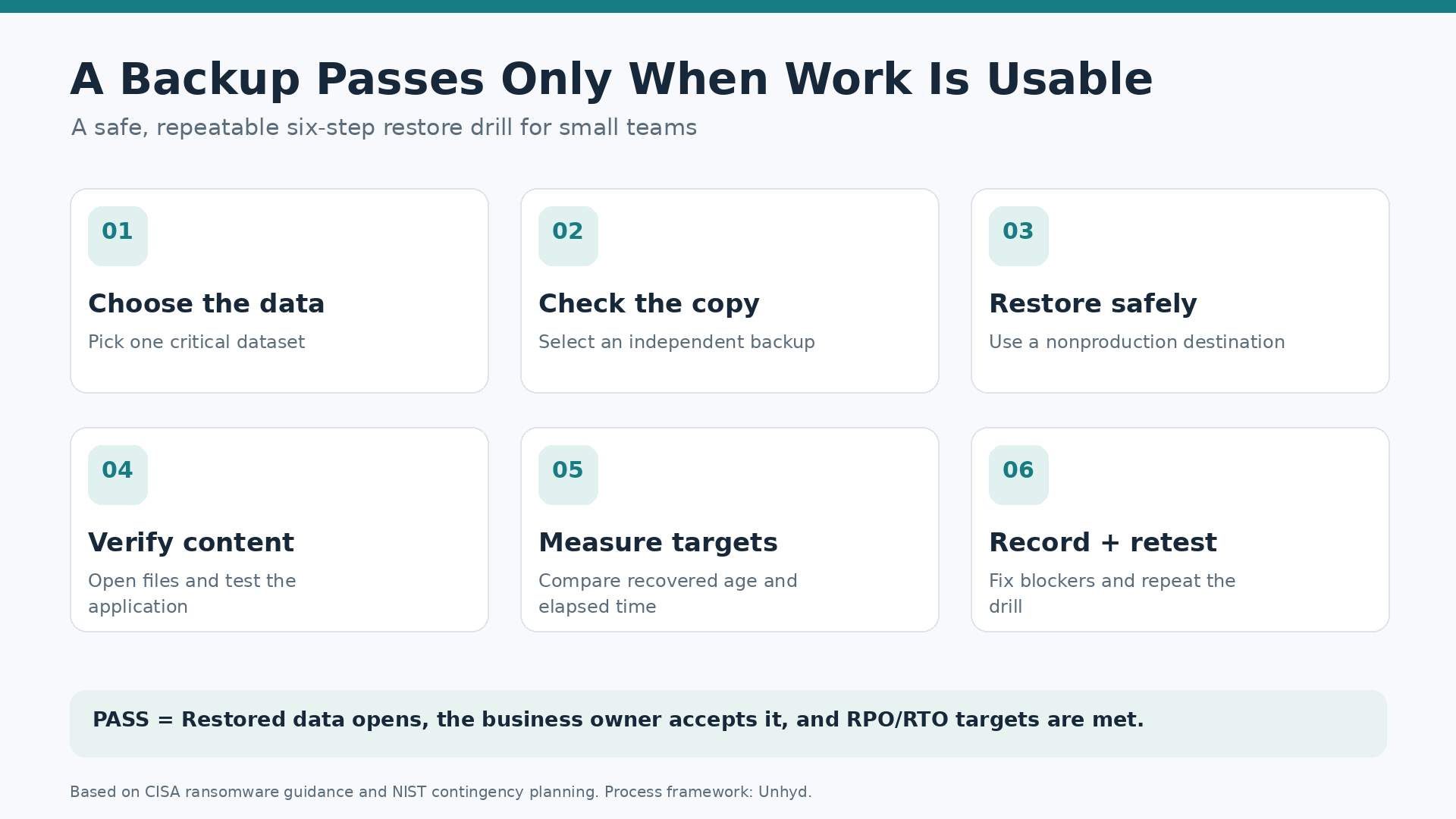
The six-step backup restore test
1. Choose a representative recovery target
Pick a nontrivial but controlled sample: a folder containing several file types, an export of a business application, or a small test database. Include a file created recently enough to test the recovery point. If your organization handles sensitive information, use a permitted test dataset or an approved protected environment. Do not expose real customer data merely to prove the backup works.
2. Select a backup that would survive the failure
Record the backup job, date, repository and version you intend to use. Verify that the copy is separate from the source and that an attacker or administrator who loses the production account could not automatically delete every recovery copy. CISA specifically recommends offline backups because ransomware may attempt to encrypt or remove backups reachable from compromised systems. An always-synchronized folder alone may not provide an independent historical recovery point.
3. Restore into an isolated destination
Use a spare device, test tenant, temporary directory or nonproduction environment appropriate for the workload. Never overwrite live production files to run a routine drill. Use the recovery credentials and keys the team would actually have during an outage; document any missing access. If a backup requires the original compromised identity provider to sign in, that dependency belongs in the recovery plan.
4. Verify usable data, not merely copied bytes
Open representative documents, compare a known file hash when appropriate, inspect record counts or run an application-level check. Ask the business owner to confirm that the recovered content is usable. For a database, confirm that the application can read expected records in the test environment. A successful transfer message does not establish that all dependencies, permissions, encryption keys and configuration files were restored.
5. Measure recovery point and elapsed time
Record the time of the selected backup, the time the hypothetical outage began, the moment the restore started and the time the business owner accepted the result. Compare the age of recovered data with the chosen RPO and the total time needed to resume useful work with the chosen RTO. A quick file copy is not necessarily the full service-recovery time if identity, networking or validation remain unfinished.
6. Record the failure and retest
Mark the result PASS only when the defined recovery target is met and the recovered information is usable. If a credential was missing, the backup was stale or the restored app could not start, write down the blocker, owner and deadline. Fix it and repeat the same test. A failed rehearsal is useful evidence; an undocumented failure is a recurring risk.
A one-page restore-test record
Use a short, repeatable form rather than a narrative report that nobody can compare across tests. Record the following fields: system or dataset; business owner; backup product and repository; backup timestamp; isolated restore destination; test start and finish; RPO target and observed age; RTO target and observed elapsed time; integrity checks; application/user acceptance; overall result; unresolved blockers; retest date. Keep the evidence in a location the recovery team can access during an outage.
Illustrative result: An orders export has a 24-hour RPO and a four-hour RTO. A test recovers a copy that is 10 hours old. Restoration and user verification take 75 minutes. If the recovered data is complete for that point in time and the application works, the example meets both stated objectives. If the export opens but lacks required customer records, the test fails regardless of speed. The numbers are hypothetical and are not measured industry averages.
Three recovery traps that a simple file restore may miss
Cloud accounts and SaaS. A provider's service availability is not the same thing as the customer's ability to restore a deleted mailbox, misconfigured tenant or overwritten record. Ask what the service retains, how far back versions go, whether administrators can export data and whether a separate recovery identity exists. Test those specific claims using your actual contract and supported procedures.
Configuration and dependencies. Recovering application data may still leave an organization without DNS settings, certificates, authentication, secrets, deployment templates or licensing information. CISA recommends maintaining system images and recovery resources as part of ransomware preparation. Document which components must be rebuilt before restored data becomes a functioning service.
Backups connected to the compromised environment. A copy stored under the same privileged account as production may be vulnerable to the same credential theft. An isolated or offline copy and a tested recovery identity can reduce that dependency. A vendor's use of the word “immutable” should be checked against the actual retention settings, deletion privileges and documented exceptions.
How often should a small team rehearse?
There is no single test frequency that fits every organization. Criticality, rate of change, recovery complexity and compliance requirements matter. A practical starting approach is to review backup-job failures routinely, perform a small file-level restore regularly, and rehearse an application or system recovery after major changes. Escalate the frequency for critical systems and when prior tests reveal problems. Treat this as a suggested operating approach, not a frequency mandated by the sources cited here.
NIST's contingency-planning guidance emphasizes planned testing and exercises; its 2026 operational-technology backup guide similarly calls for regular backups, testing and review during recovery exercises in industrial settings. Industrial recovery has additional safety and availability constraints; do not apply a general small-office drill to operational technology without qualified personnel.
For context, Unhyd's small-business cybersecurity coverage discusses preventable weaknesses, while its secure-by-design guide addresses controls that should be built into systems before incidents occur. Restore testing complements prevention; it does not replace it.
The decision a completed drill should enable
At the end, the owner should be able to answer four questions: Which data can we restore? How old will it be? How long until people can use it? Who has the access and authority to perform the recovery? If those answers are supported by a dated test record, the organization has evidence rather than reassurance.
A backup restore test is not a promise that every disaster will unfold the same way. It is a controlled way to discover missing permissions, broken archives and unrealistic recovery assumptions while there is still time to fix them. The useful output is not a green icon; it is a demonstrated recovery and a short list of corrections.